
Every student.
The right support.
Right on schedule.
Focus Period helps schools match every student with the learning time they need—with flexibility, clarity, and control built into every school day.
Empower students to take ownership
Set guardrails and keep schedules on track
Everything in one smart, simple system.
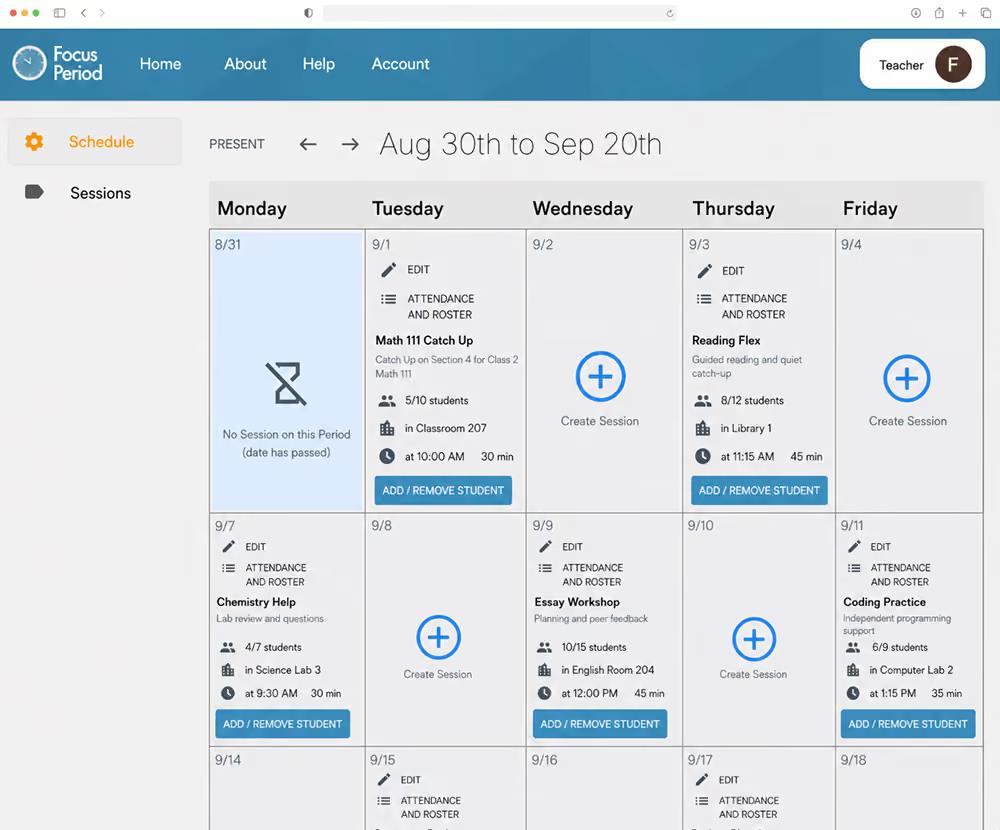
Daily Student Logins
Every feature exists because a real school day needed it
A spreadsheet doesn't know where a student needs to be.
Scheduling
Set up once, runs automatically every period
Placement
Every student placed, visible in real time
Intervention
Flagged students locked in automatically
Attendance
Taken inside the period, in a few clicks
Scheduling
Rebuilt by hand in a spreadsheet, every cycle
Placement
Paper hall pass — easy to lose, hard to audit
Intervention
Depends on a teacher remembering who needs help
Attendance
A second, disconnected task nobody fully trusts
Three views. One clearer school day.
The right level of control, choice, and visibility for every role.
Administrator
Run the schedule
Advanced control over Focus Periods, student placement, attendance visibility, and school-wide patterns.
Manage student placement
View attendance across the school
Lock and unlock sessions
Teacher
Shape your own session
Create Focus Periods, shape each session, lock in students when needed, and track attendance.
Create sessions
Lock in students
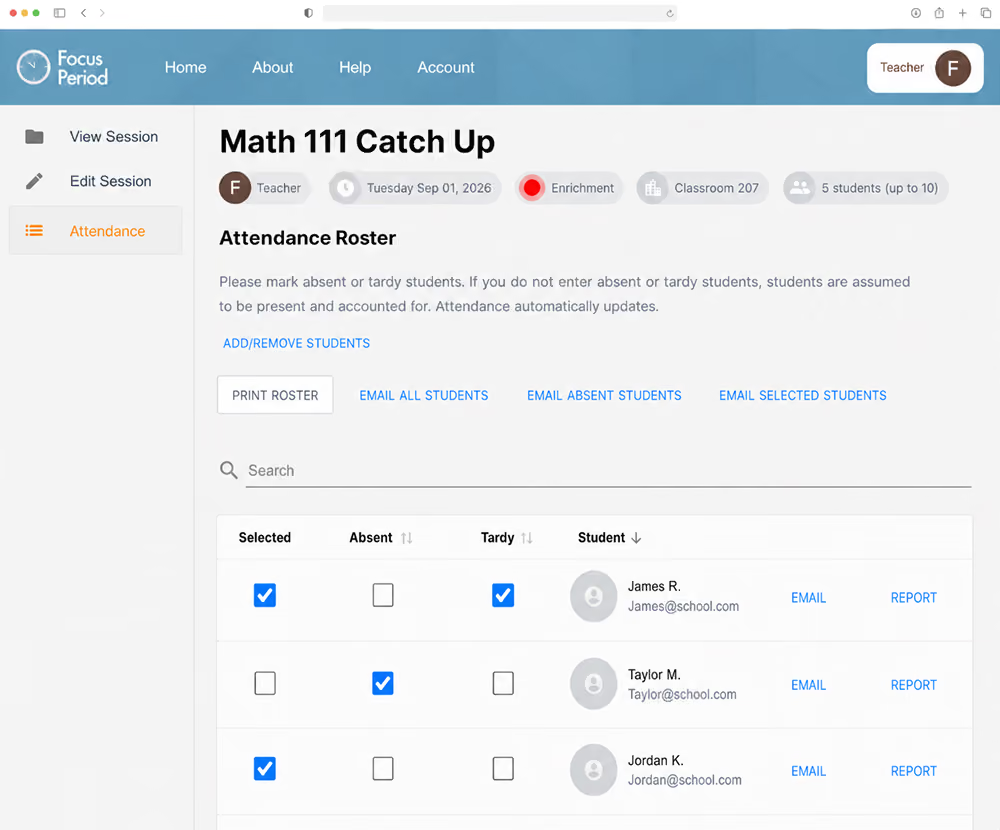
Take attendance and manage rosters
Student
Choose where to be
Choose the Focus Period that best fits your needs, interests, and goals when you are not locked into a session.
Browse available sessions
Choose by subject or need
Select a session that fits
From Planning to Placement in Three Simple Steps
Step 1
Prioritize Student Needs
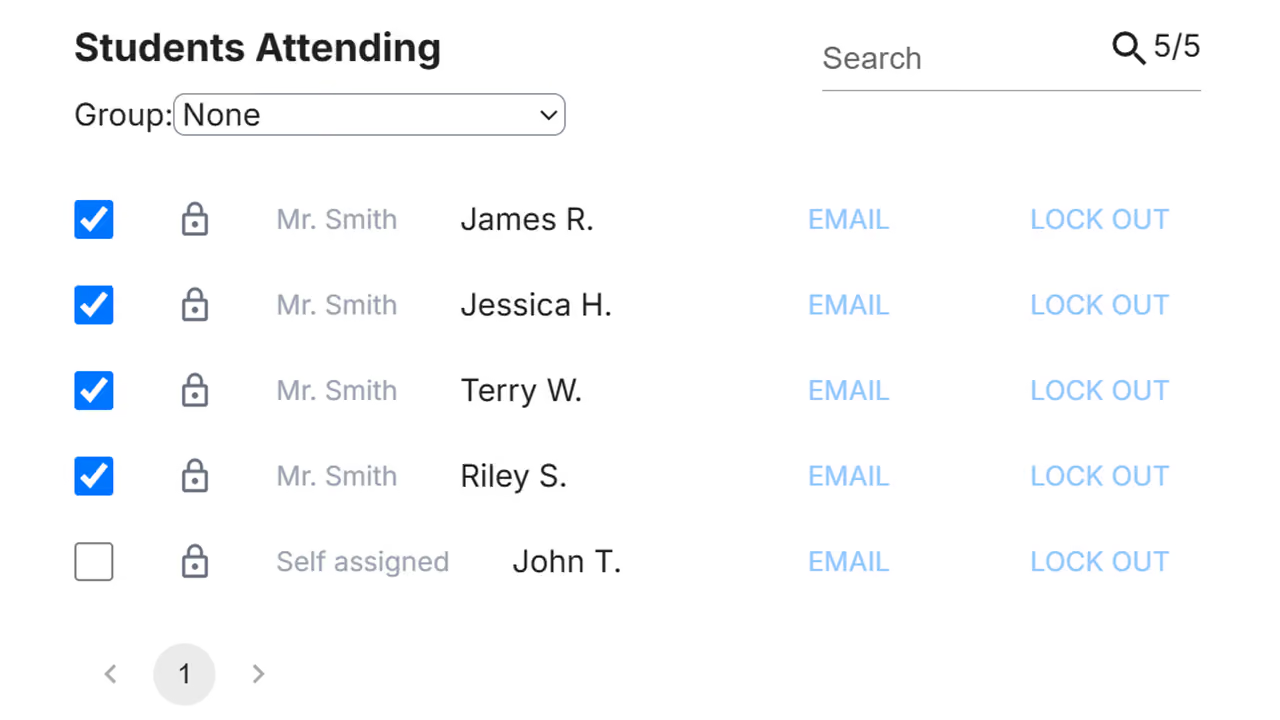
Flag individual students who need help with a specific skill or a larger group that needs additional instruction, and easily place them in the appropriate session.
Step 2
Empower Student Choice
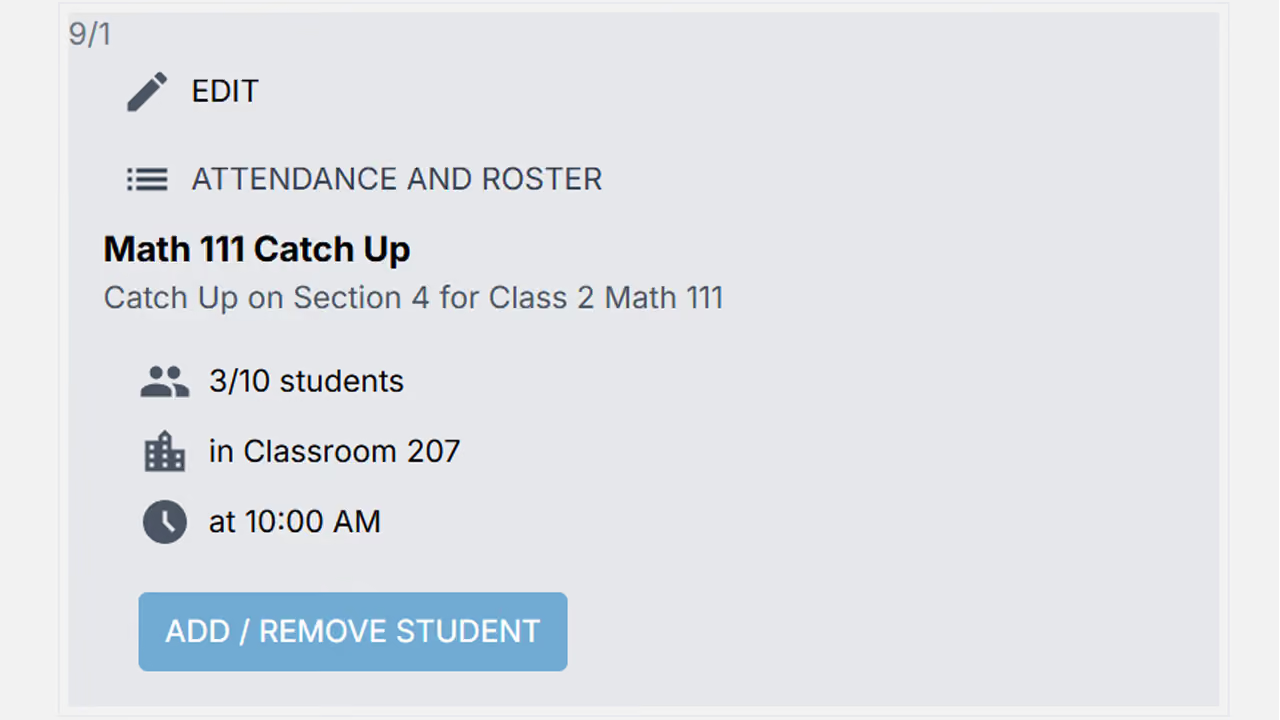
Everyone else browses and joins that day's sessions: academic help, arts, or enrichment opportunities, based on what a school offers. Students choose their own session.
.avif)
Step 3
Automate the Rest
Students who don't choose and aren't locked in are placed automatically based on your administrator-customized defaults, so every student has somewhere to be.
Flex period, WIN time, advisory period. Focus Period runs all of them.
Every school defines flexible time differently: a 25-minute block, a full hour, daily, twice a week. Focus Period is built to match it, not the other way around.
Regardless of what your school calls this time, the platform adapts to it. It configures to your existing schedule during setup, not the reverse.

Support Looks Different for Every Student
Most students don't need daily intervention. Sometimes they just need another opportunity to work through a concept before a small gap becomes a bigger one.
Students who need more consistent support get that too, with their placement and participation tracked automatically.
Focus Period doesn't define what success looks like for each student. It gives teachers the structure and flexibility to provide the right support at the right time.
Everything a Focus Period needs, built in.
Locked-in placement
Teachers lock students who need intervention into their session, then hand choice back once the student is ready.
Student choice
Everyone else browses and joins sessions on their own — academic, arts, athletics, or anything your school offers.
Fast attendance
Taken inside the Focus Period, in seconds. Designed to make the ‘attendance twice’ concern a non-issue.
Cross-roster sessions
Teachers can collaborate by mixing rosters, so each one can focus on the group they're best suited to help.
School-wide reporting
Administrators see where every student is, who's being served, and how Focus Period is actually being used.
Your schedule, your rules
Customize Focus Period to fit your school's schedule, whether it's daily or a few times a week.
See Focus Period in Action
Questions About How This Fits Your School?
Book a live walkthrough on our demo school and get real-time answers, not just a recording.
One platform fee.
Sized to your school.
No seat counts to reconcile, no per-teacher add-ons, and no renewal surprises. Year one adds a one-time $500 onboarding fee; every year after that is the number on the right.
Adjust the slider to see your annual price.
If you have more than 3,000 students, contact us for custom pricing.
Hear It from Educators

Go for it! It is a great selling point for prospective parents. It allows for more student support and intervention as needed. Helps with not asking teachers to come in early or stay late.

Focus Period makes flexible scheduling far more organized and manageable. It reduces stress for administrators and staff while giving students a clearer, easier way to take responsibility for how they use their time.

Meeting each student’s needs is built right into our schedule with Focus Period. During our Focus Period, teachers connect with students for strategic intervention or extension, right where it’s needed most.
Already Running Something Like This?
Already have WIN time, an advisory period, or a built-in tutoring block? Focus Period doesn't replace it—it gives your school a better way to manage it.

Questions? We’ve got answers.
About the product
A Focus Period is protected time built into the school day where students are placed based on need, not left to sit unstructured. Teachers lock in students who need targeted help; everyone else chooses their own session.
Teachers flag students who need intervention and those students are locked into that session automatically. Every other student selects from the sessions available that day. If none are selected, the student is automatically placed in a relevant session.
Yes. Schools use it for athletics, arts rehearsal, student leadership, career exploration, counseling groups, club meetings, and more.
Middle and secondary. Students need to be able to navigate choosing and managing their own sessions.
Setup and onboarding
A short intake covering the school's email platform, size, device setup, and current intervention processes, followed by a setup call.
It works alongside it. Focus Period manages flex-period placement, attendance, and reporting specifically; it isn't meant to replace a school's core SIS.
Right now, yes. Focus Period runs on Google Workspace for school email and login. If your school uses Microsoft 365 or something else, reach out. We're tracking demand and can let you know if that changes.
Yes. A typical rollout includes working sessions with a small group of administrators or staff, plus the option to explore a demo school environment before going live.
For teachers and staff
Teachers lock in the students who need to be in their session and take attendance inside Focus Period, which is designed to be fast. Beyond that, the system handles placement and reporting.
Functionally, yes—once in the SIS and once in Focus Period, since flex time runs separately from the regular class schedule. Most schools find it becomes routine quickly.
Yes. Teachers who plan together can mix and match rosters during the Focus Period, one teacher taking a group strong in one area while another takes the group that needs more support.
It varies by school. Some run it daily; others a few times a week. This is a configuration decision each school makes, not something the platform locks in.